AI-native operations platform for medspas, centered on the voice front desk
An AI-native operations platform for medspas, with a voice agent at its center that answers the phone, books against the live schedule and hands the call to a person when it can't finish it. I spec'd and owned the voice front desk on a platform that grew to 3,500 locations.
3,500locations
- Company
- Rhodium
- Role
- Director, Product
- Team
- 10-person distributed team across three regions; ~2 PMs
- Timeline
- 2023 – 2026
- Platforms
- Phone, Web
- Type
- AI
TL;DR
- Problem
- Rhodium is an AI-native platform for multi-location medspas and aesthetic practices. Its voice AI front desk answers calls, pulls the live schedule and the client's history, books and reschedules, covers after-hours, and routes to a person with a summary of the call.
- What I did
- As Director, Product I spec'd and owned the voice front desk (inbound phone and in-app), and, as product, the churn-propensity model and Smart Waitlist, which engineering built. I built Smart Message Guard and owned positioning and go-to-market, leading a 10-person team across three regions.
- Result
- The platform grew to 3,500 locations from December 2023. Platform-level outcomes, credited to no single feature: 38% average rebooking lift, 40% no-show reduction (a customer's figure), about $47K found per practice in 90 days. Repositioning lifted feature activation 30% in a quarter.
Context & problem
Rhodium is an AI-native B2B2C platform for multi-location medspas and aesthetic practices. Staff run the practice from an operations product, and their clients book through a web app. The voice AI front desk is the part that answers when a client calls.
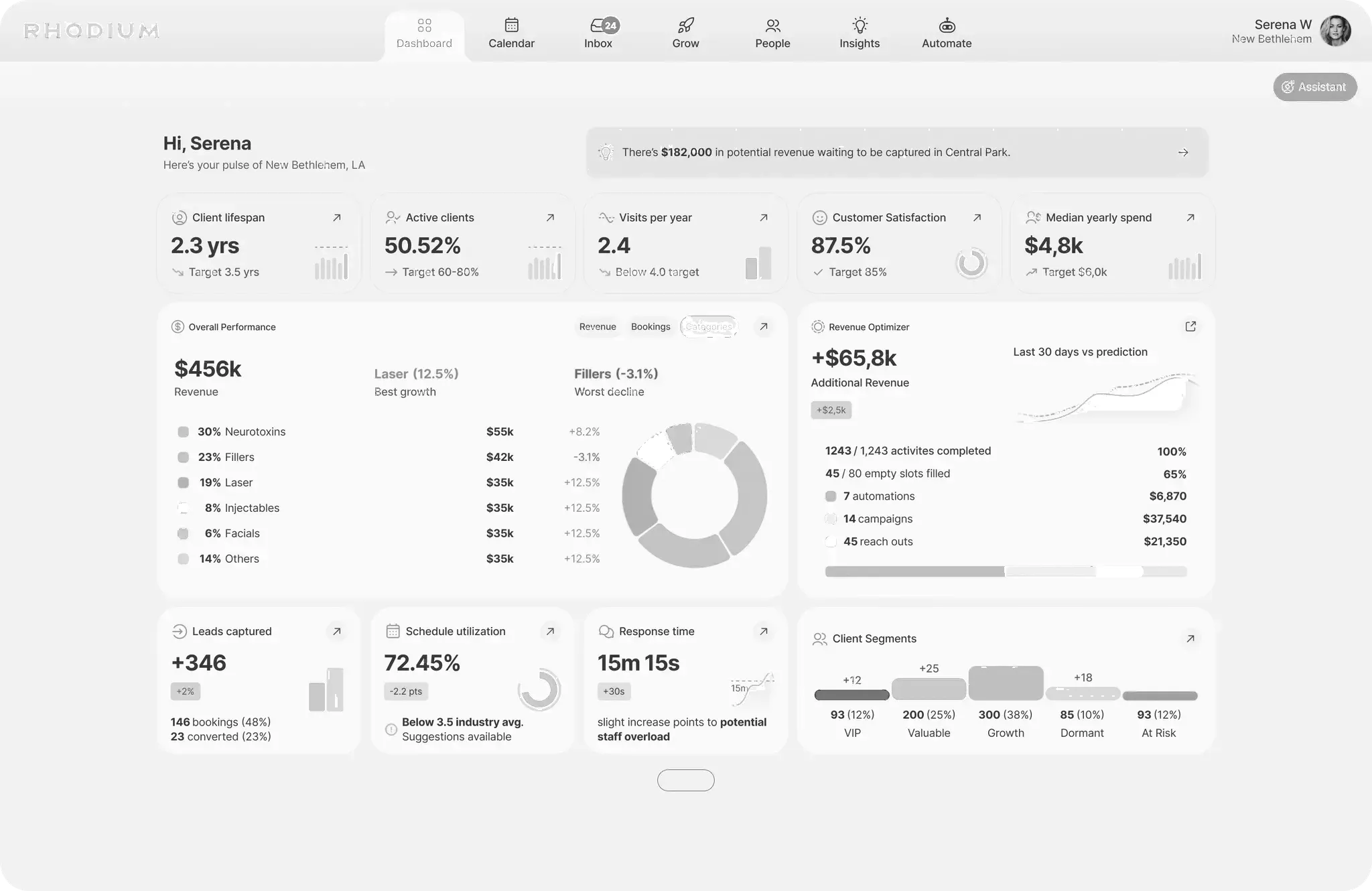
I was Director, Product from September 2023 to March 2026. The platform runs the practice: booking, POS, inventory and loyalty; a unified inbox for SMS, email and voice; cohort and LTV analytics; Revenue Radar, which scores untapped revenue across 10 dimensions; and competitive intelligence that monitors pricing and availability across 12+ platforms. It connects to 10+ EMRs, takes 7 days to implement, and grew to 3,500 locations from December 2023.
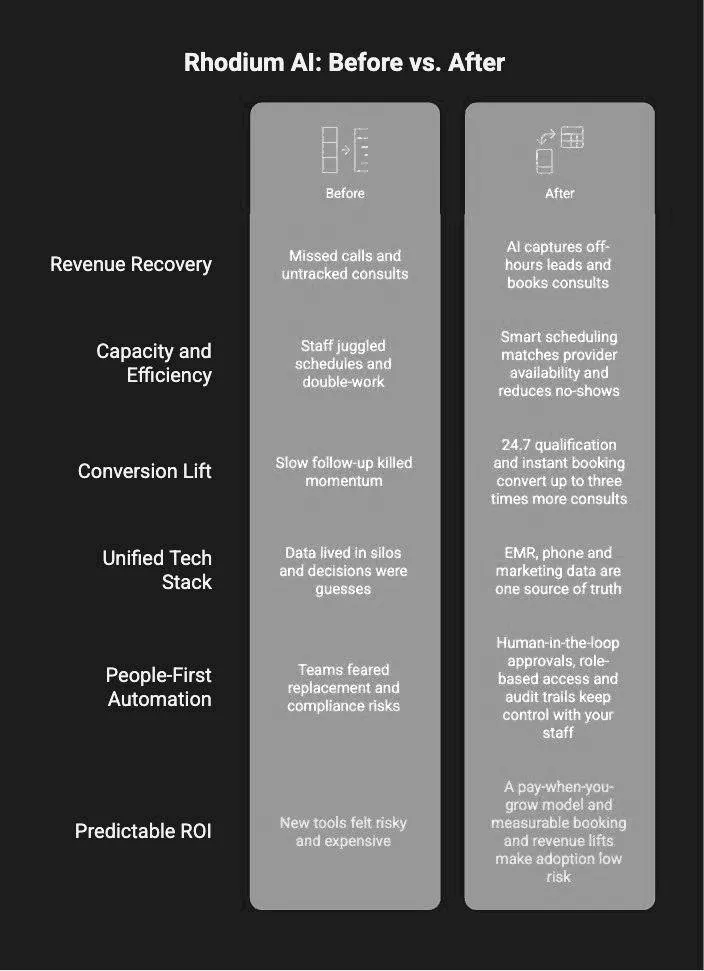
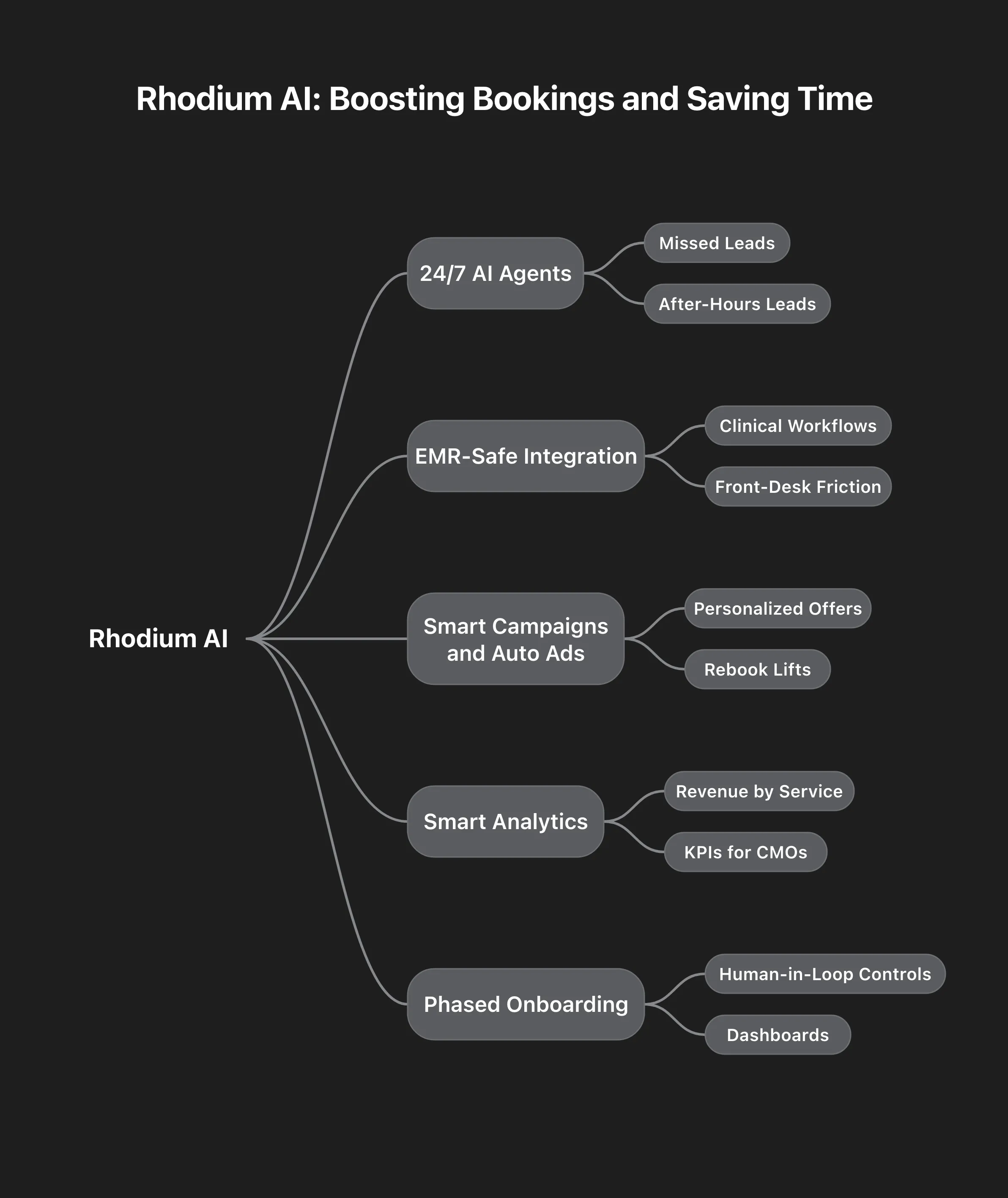
Two diagrams below show what running a practice looked like before and after, and the capabilities the platform is made of.
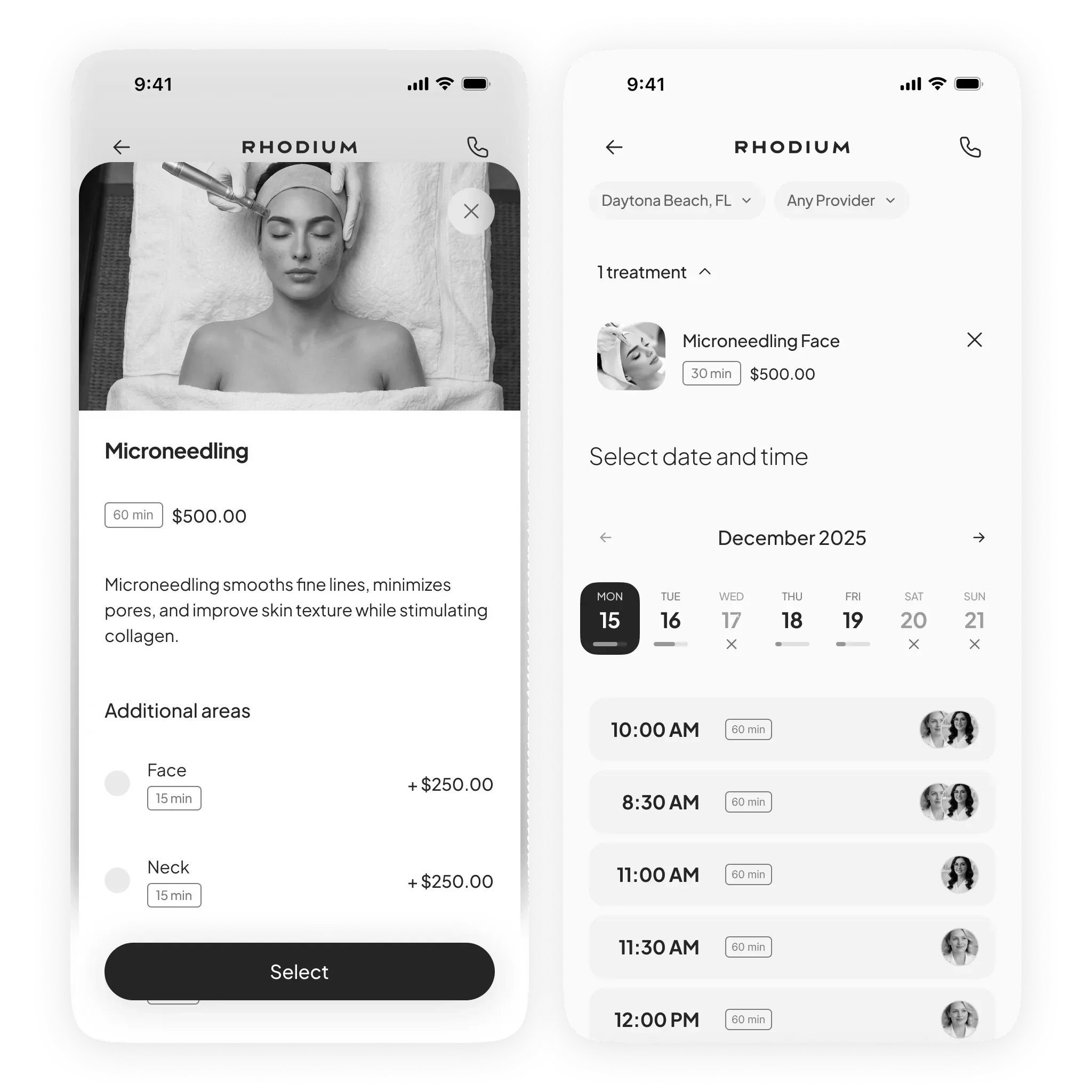
The client side is a web app, not a native one, and that was a product decision rather than a capability gap. Clients book a few times a year, a single SMS link completes a reschedule, and install friction wasn’t worth it. The voice front desk points the same way: the phone is a channel clients already have, and it asks them to install nothing.
This page is about the voice AI front desk, which I spec’d and owned, and the two models I spec’d and owned as product next to it: a churn-propensity model and Smart Waitlist.
Discovery & insight
I was on the phone with owners most days: a standing conversation with the people running the practices.
The question I took into the spec was where the agent should act on its own, where it must hand off to a person, and what it does when it can’t resolve a request. On a live call, a confident wrong answer damages trust faster than a slow human one. In a clinic, where the call can be about someone’s care, that cost is higher still.
So the design rule was two-sided. Give the agent enough to finish the task: the live schedule and the client’s history, so it can book and reschedule instead of taking a message. And give it a clear line where it hands the call to a person and leaves a summary behind.
HypothesisBy changing front-desk calls that only staff could take to a voice agent that books and reschedules from the live schedule and the client's history, and hands off to a person with a summary for multi-location medspas and aesthetic practices, we expect calls that end with the appointment booked or moved to move, because a booking call is resolved when the schedule changes, and that takes the live schedule, the client's history and a clear point where a person takes over.
Strategy & bets
Three bets.
Finish the task. The agent answers, reads the live schedule and the client’s history, and books or reschedules. An agent allowed to change the schedule is a bigger commitment than one that answers questions, and that is the commitment the spec made.
Hand off on purpose. I treat the escalation policy as part of the product, not an exception path. The agent routes to a person when it should, covers after-hours, and leaves a summary of the call, so whoever picks it up next has the context.
One front desk, two surfaces. The same agent covers inbound phone and in-app.
Two diagrams from Rhodium’s material place AI in the platform. The first shows six stages from basic to advanced, from scheduling to agents that refine their own workflows. The second shows a bridge from manual data work to targeted revenue plays: unify the data sources, automate campaigns, daily briefings.
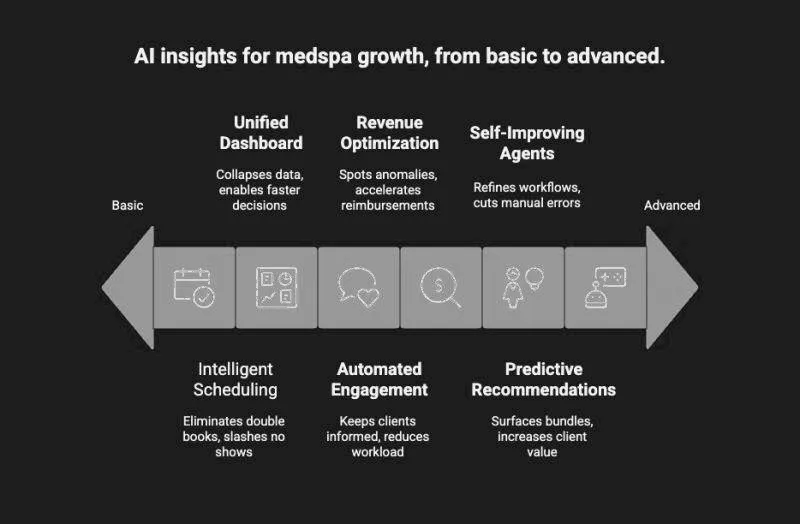
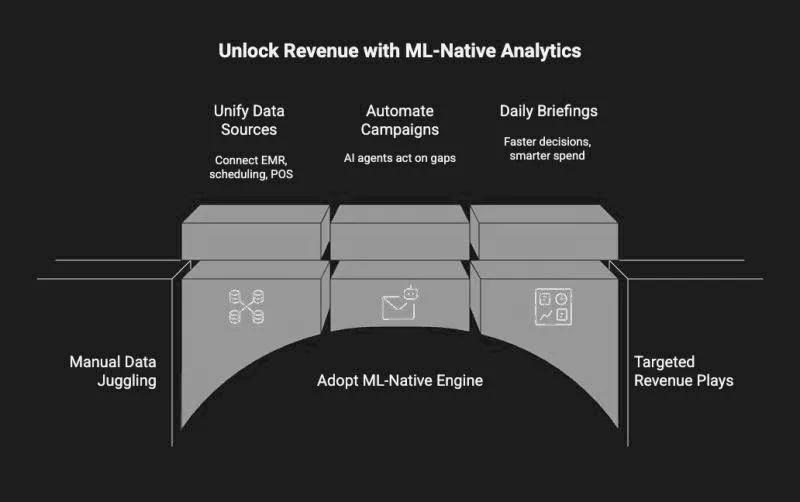
Around the agent sit two systems that act instead of waiting. I spec’d them and owned them as product; engineering built them. The churn-propensity model flags clients for automated win-back. Smart Waitlist matches last-minute cancellations to clients waiting for a slot.
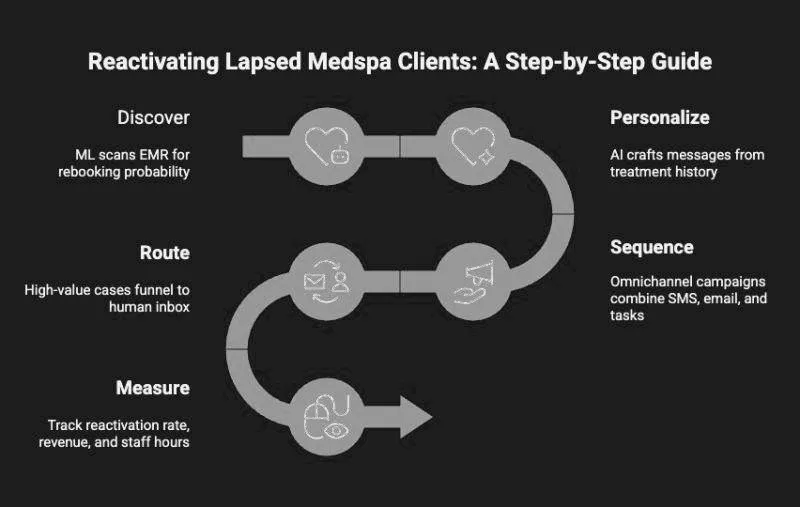
The win-back diagram lays out five steps, from finding the clients likely to rebook to measuring what came back.
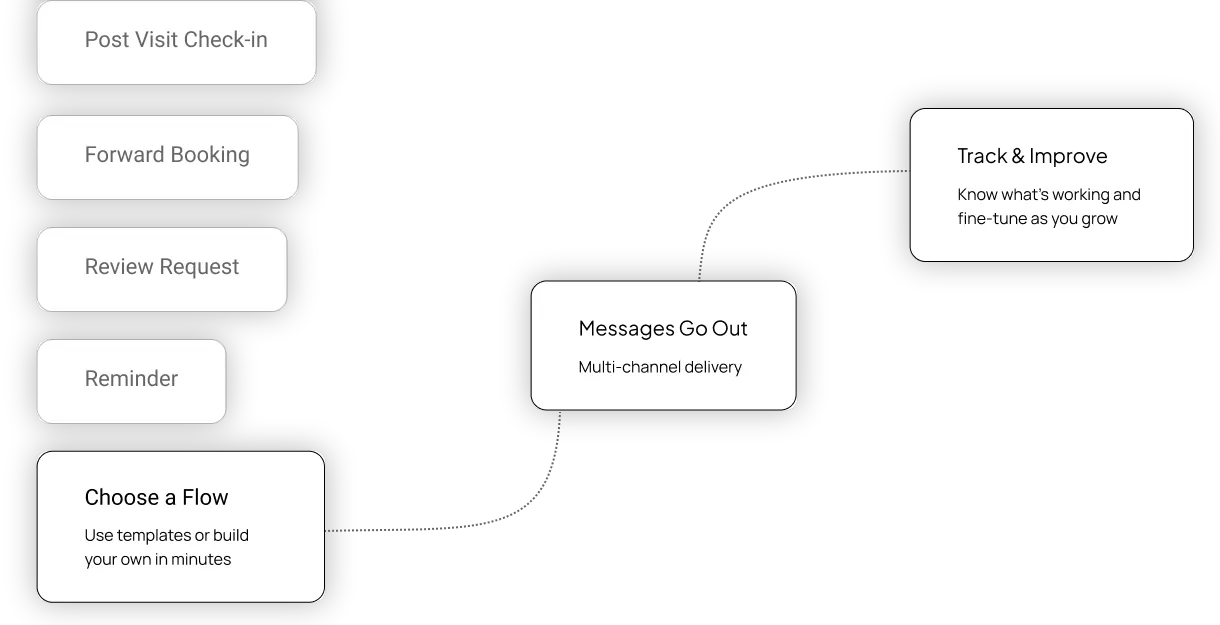
The platform also has an automation builder, where a practice sets the rules for its messages. The first picture below is an early wireframe of a campaign flow: pick a flow, messages go out, track and improve. The second is the builder in the product, with a trigger from the EMR, a delayed text message and a performance panel.
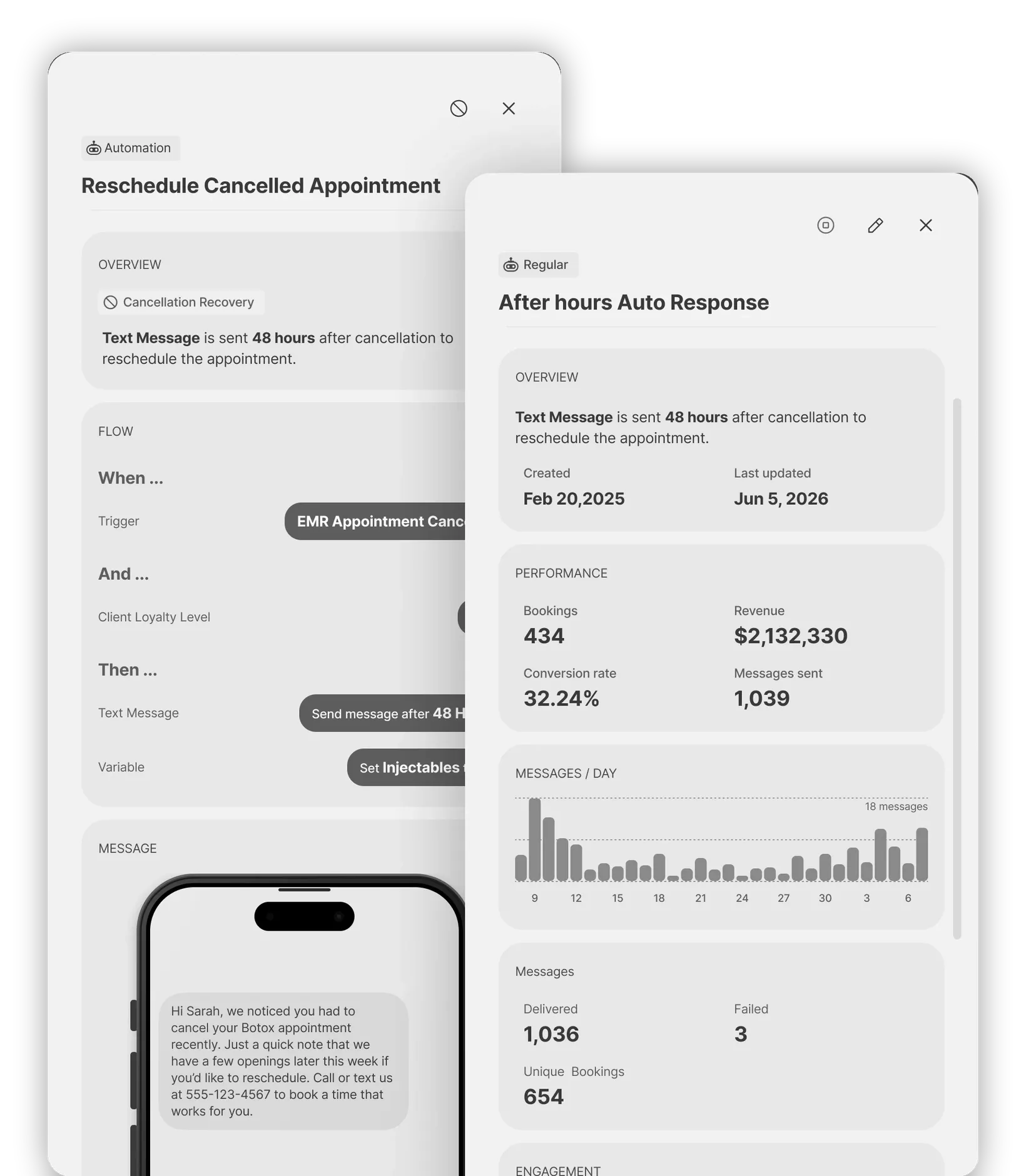
Separately, one guardrail I built: Smart Message Guard, a contact-frequency guardrail. A platform with an inbox, win-back and a waitlist will keep finding reasons to send one more message. Smart Message Guard decides when not to.
Beyond the agent, I owned positioning and go-to-market for the platform, and repositioning the product around one clear idea lifted feature activation 30% in a quarter.
Solution
From the caller’s side, by phone or in the app: the call is answered. The agent pulls the live schedule and the caller’s history, books or reschedules, handles after-hours the same way, and routes to a person when a person is needed. From the staff’s side: the agent leaves a summary of the call.
Voice is harder than chat in specific ways. The caller can’t see the system thinking, so latency reads as hesitation. People interrupt, so turn-taking has to cope with a caller who talks over the agent. And names, of clients and of treatments, are where recognition is most likely to slip.
AI Phone Coach sits next to the front desk on the platform: call transcripts, AI summaries, per-staff sentiment and performance scores.
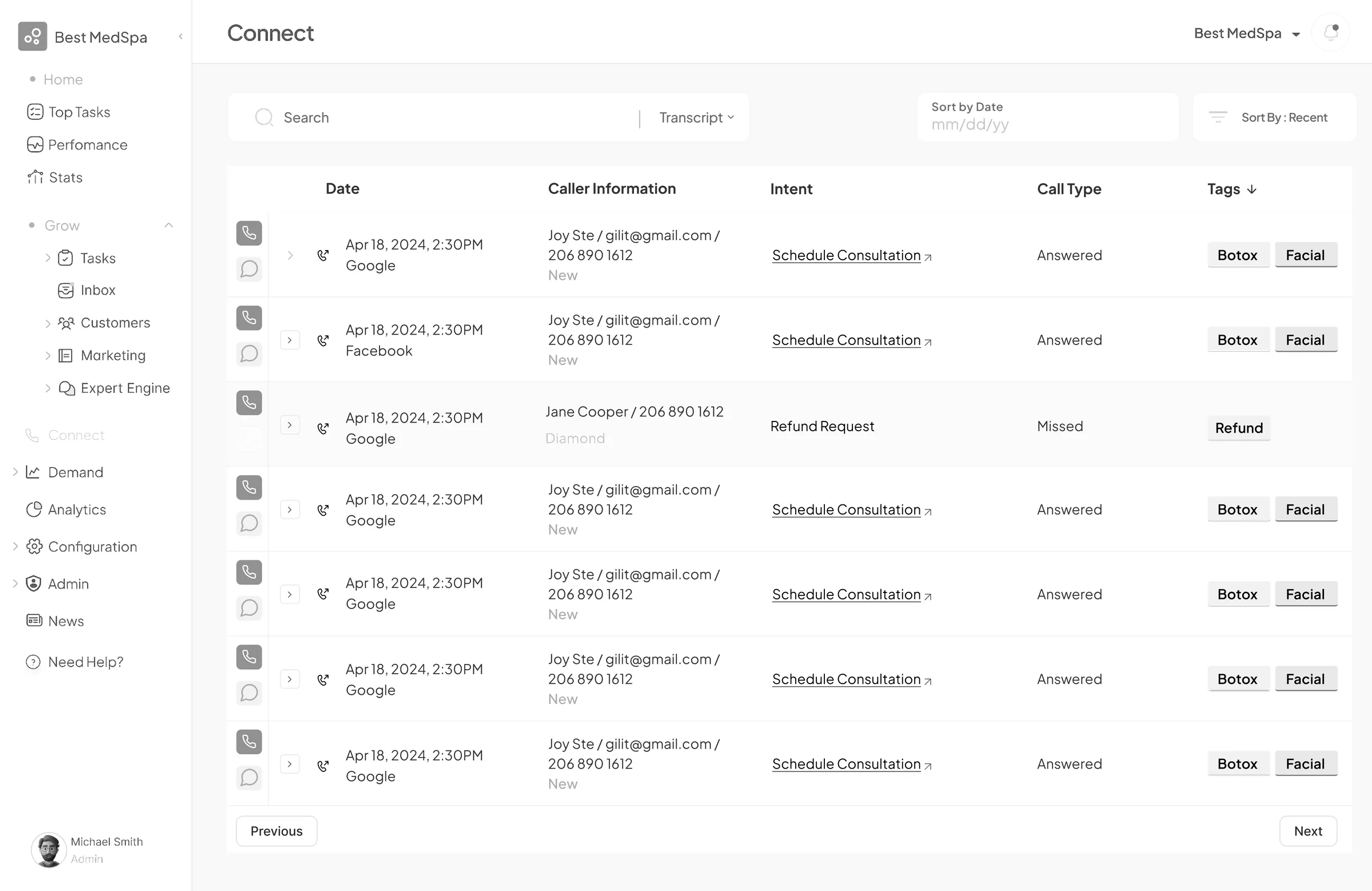
Staff see calls in the call log. The list view shows each call with its source, caller status, intent, outcome and treatment tags, with answered and missed calls marked.
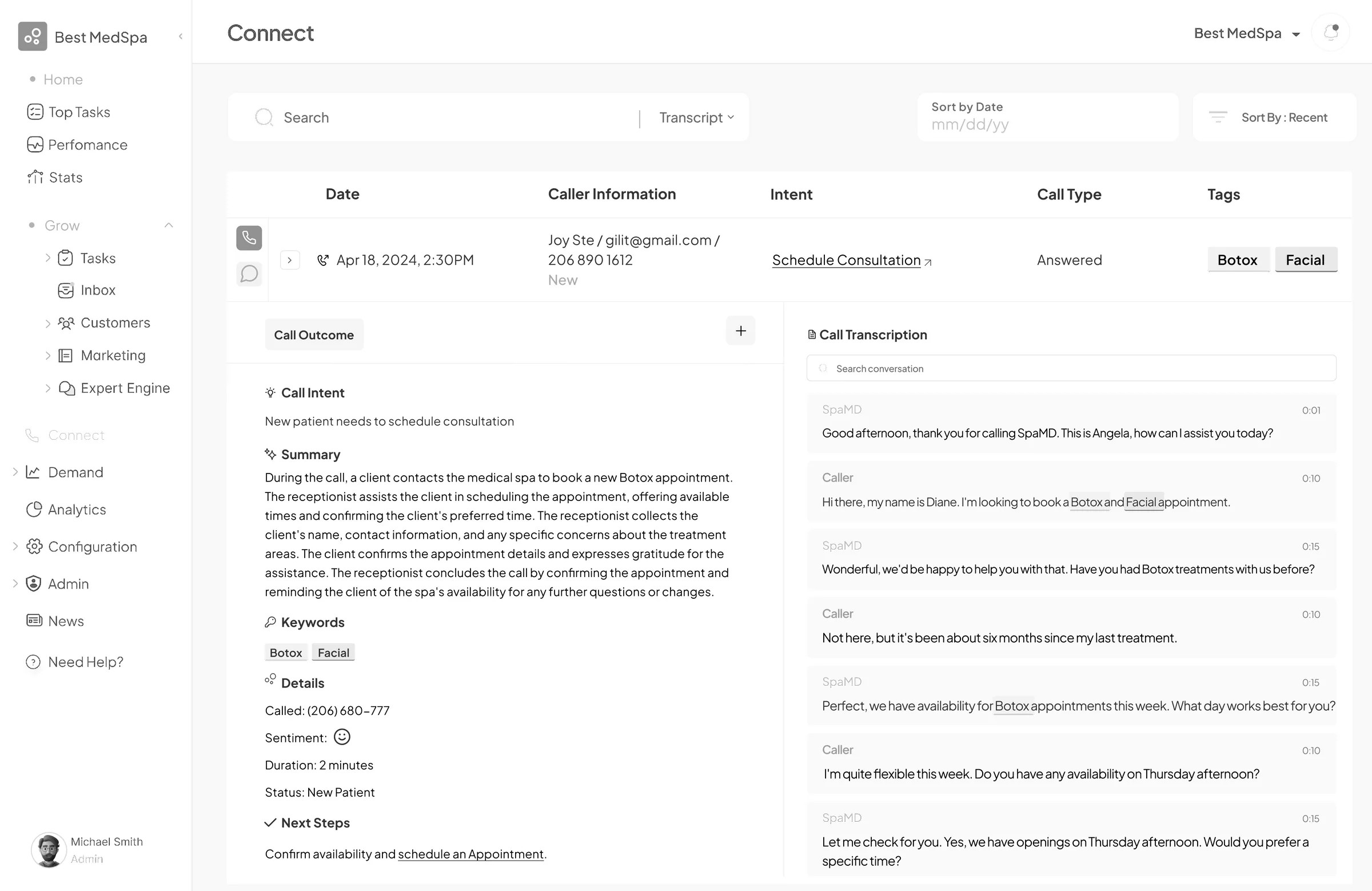
Opening a call shows what the platform kept from it: an outcome card with the caller’s intent, an AI summary, keywords, sentiment, duration and next steps, beside the turn-by-turn transcript.
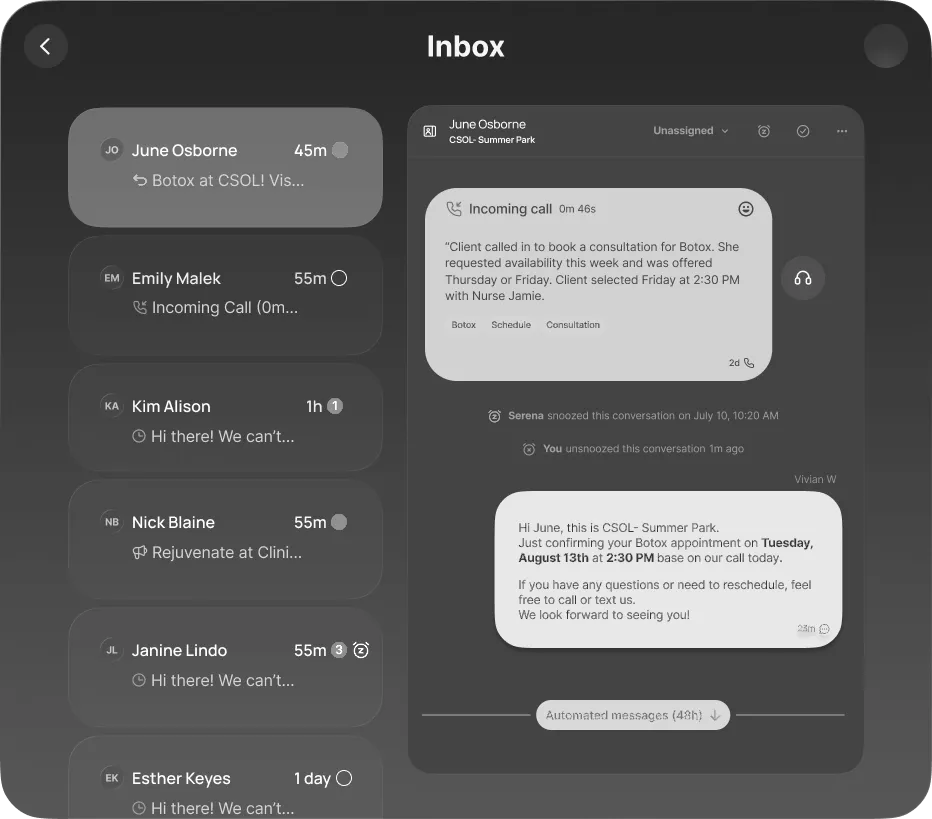
The unified inbox puts SMS, email and voice in one view, and Smart Message Guard sits on the outbound side as the contact-frequency guardrail. In the thread, a call arrives as a card with its duration, sentiment and AI summary, and staff can pick up from it with a text.
Smart Waitlist and the churn-propensity model work toward the schedule. One fills slots that last-minute cancellations open; the other flags clients at risk of not coming back for automated win-back.
The cards below are three components from the analytics views, one shown in light and dark: a client stats card, a treatment mix as a six-axis radar, and a phone call heat map.
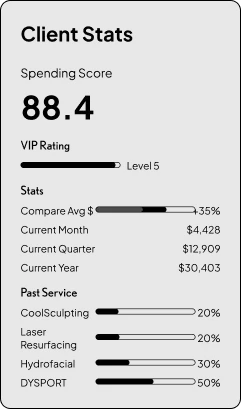
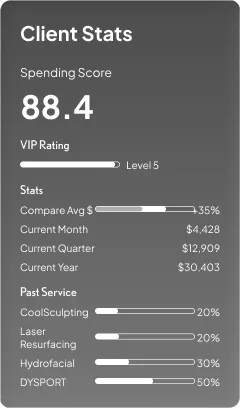

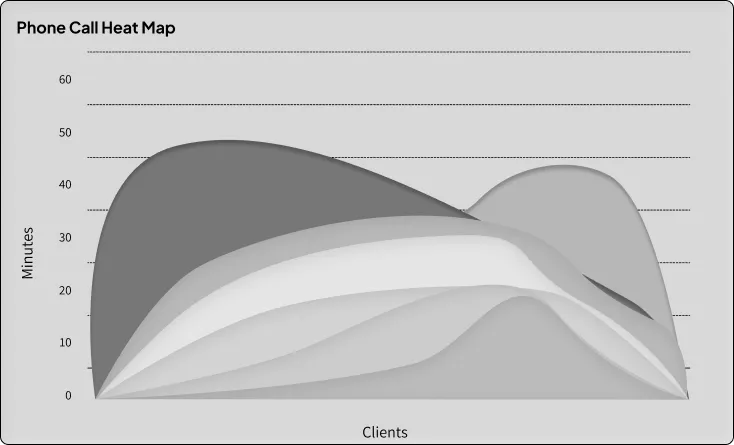
On the client’s side, the web app is reached by a single SMS link, which is enough to complete a reschedule.
Execution
I led a distributed 10-person team across three regions, the U.S., Europe and LatAm, covering product, engineering, design and marketing, and managed about two PMs.
A team spread across time zones runs on the written spec, and for an agent the spec has to settle the edge cases: what it does alone, when it hands off, what it does when it can’t resolve the request, and what the summary has to carry for the person who takes over.
I wrote the specs for the voice front desk and the two models and owned them as product; engineering built the two models. Smart Message Guard I built. Positioning and go-to-market were mine, and so were the conversations with owners, most days.
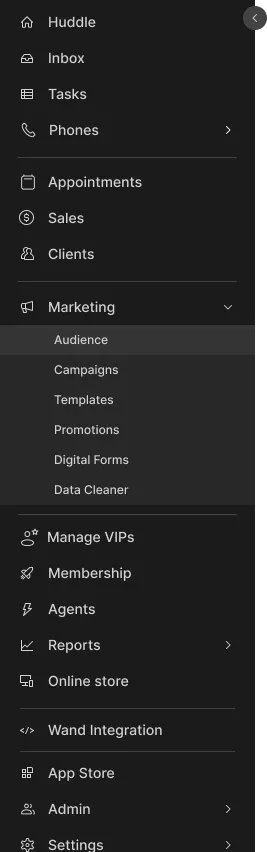
The platform’s navigation, in its collapsed and expanded states, lists the breadth it covers, from the inbox, tasks and phones to clients, marketing, memberships, agents and reports.

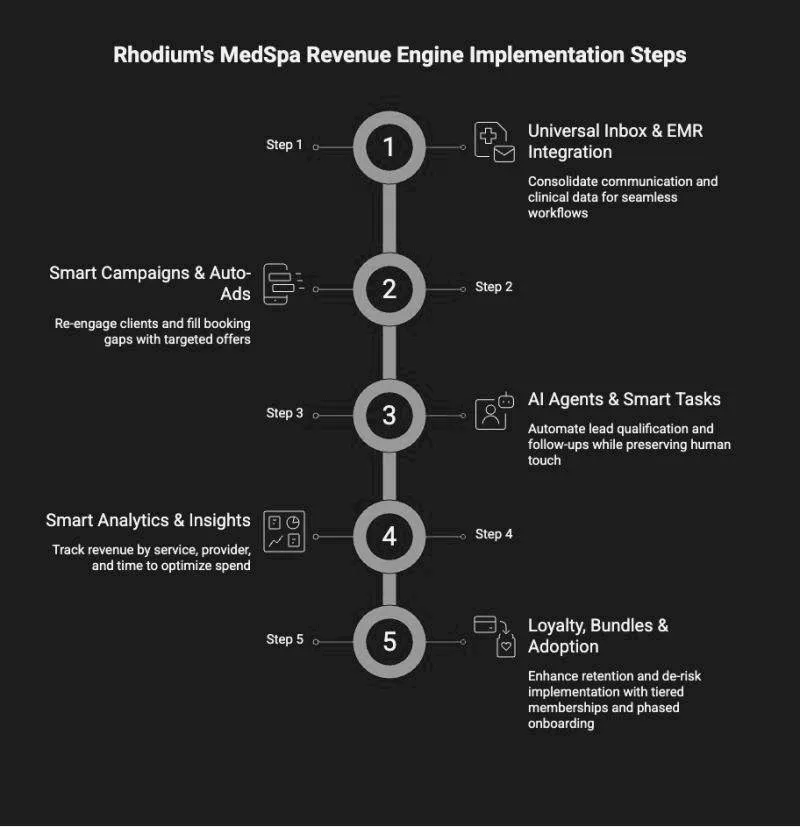
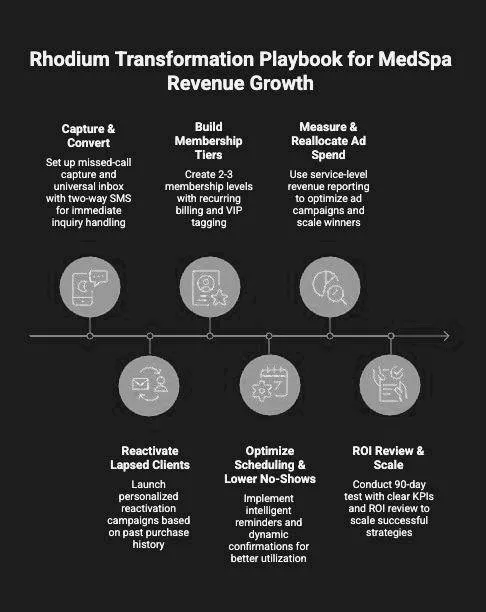
Two diagrams from the product’s material lay out the five implementation steps, from the universal inbox and EMR integration to loyalty, bundles and adoption, and a playbook for a practice’s revenue growth, from capture and convert to an ROI review.
Validation & results
For the voice agent, what I judged it by was how a call ended: whether the appointment was booked or moved, why the agent routed to a person, and whether the summary gave the person picking up what they needed. A handoff on its own isn’t a failure. The things to catch are a handoff that comes too late and a booking the agent shouldn’t have made.
The rebooking, no-show and revenue figures belong to the whole platform. They are not credited to the voice agent or to either model, and the no-show figure is a customer’s own statement. The activation figure follows the repositioning.
Reflection
The lesson I’d take into the next agent product is to write the handoff before the happy path. A demo shows the happy path; a practice decides whether to trust the agent on the calls it can’t finish.
The web-app decision points the same way from the client’s side. For someone who books a few times a year, the right channel is one they already have: a text message, or a phone call.